Referrals
Members invite friends. When a friend reaches the stages you define, the referrer earns the configured rewards. Stages can reward a sign-up, verification, funding or trading.
Last checked 29 Sep 2026
- Category
- Earn. Referral programme rewards go to the referrer only.
- Your cost comes from
- Stage rewards, an optional programme completion bonus, and any separate friend welcome reward you create.
- Rewards are credited
- The platform processes rewards after the friend's qualifying data is evaluated. There is no claim step; processing time varies.
What members see#
- Open the Referral page. The standard member page requires Create Invites permission, which is off by default for new roles.
- Copy the personal invite link and share it with a friend. The standard page has a copy button.
- The friend joins through the invitation or through your own registration page when you have configured that flow.
- As the friend qualifies for stages, the platform processes the referrer's rewards and updates progress.
- The referrer can review activity totals, programmes and each friend's stage progress.
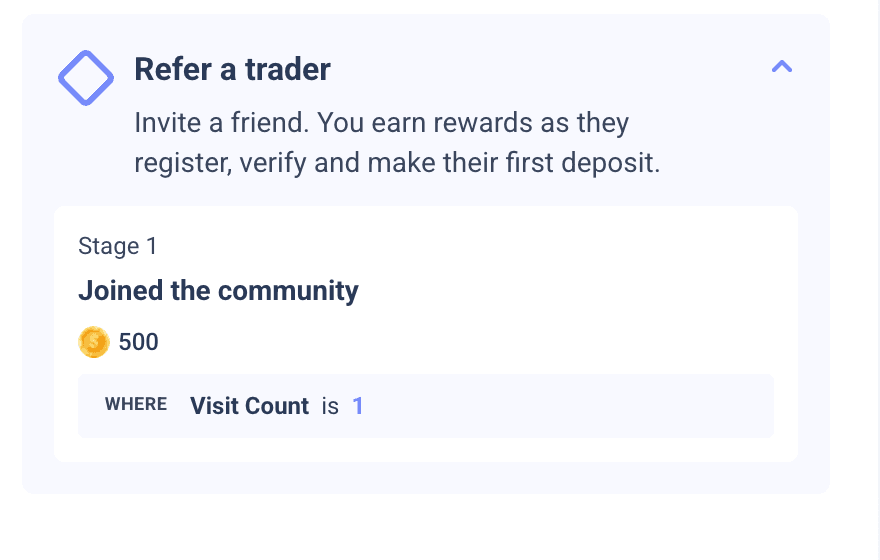
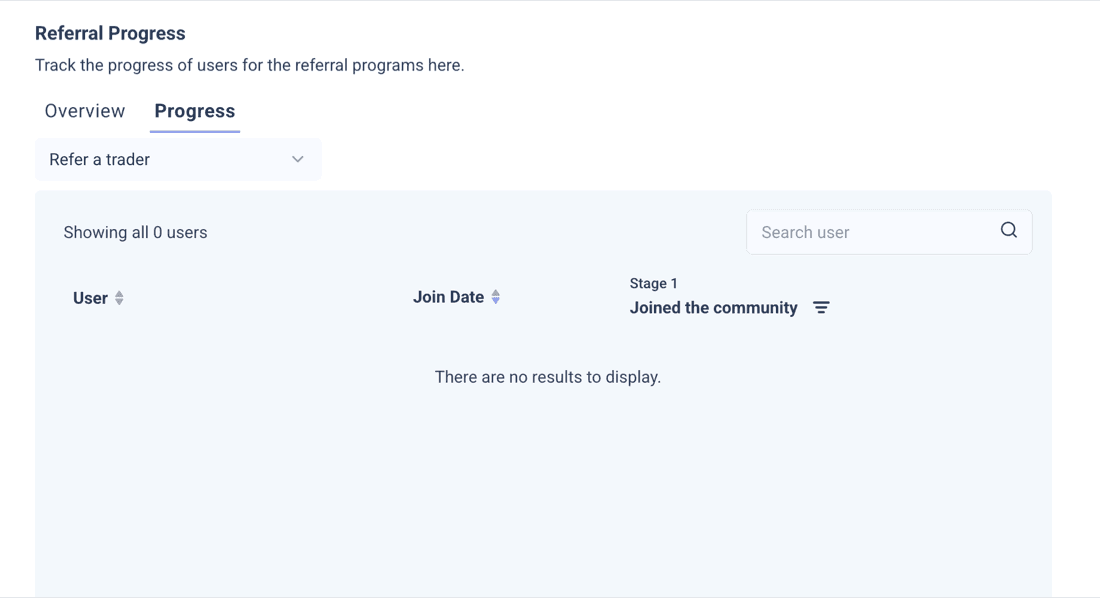
Product screenshots show a test community without an invite address. A referred friend must meet each stage's configured AND/OR conditions.
The friend does not receive a reward from the referral programme itself. To give the friend a welcome reward, use a separate milestone or your own offer.
What you control#
Enable the Referral Program master switch and at least one programme with stages. Configure a custom link only for your own registration page, and Widget Settings only if you embed the referral experience.
| Setting | What it does |
|---|---|
| Referral Program | Master switch. When off, the member page says the referral programme is unavailable. |
| Custom Referral Link | Points an invitation to your own registration page. Map its referrer value to a unique, populated custom identifier. Attribution is skipped when that mapped value matches multiple community members. |
| User information display | Choose whether the referrer sees a referred friend's ID, display name or profile picture, and whether names are shown fully or partly masked. |
| Programmes | Create named programmes with colour, icon, description, stage count, display order and an on/off switch. The editor does not show a fixed count limit; confirm practical limits for a large catalogue. |
| Programme rewards | An optional XP or coin bonus to the referrer when one friend completes every stage, on top of the stage rewards. |
| Stage conditions | Use community counters or custom user fields such as deposit, KYC and lots. Combine conditions with AND or OR, and add member-facing wording. |
| Stage rewards | Pay XP, coins or role and tag actions to the referrer. Each reward type needs its corresponding XP or currency system enabled. |
| Widget Settings | Control embedding mode, allowed domains, size and theme. Choose referral blocks and activity statistics in the custom widget builder. |
| Referral Log | Review referred-user and stage-cleared entries, reward amounts, filters and CSV export. |
Who can open the member page
The standard Referral page is available to the community owner and members whose role has Create Invites permission. Confirm access separately for an embedded widget.
How it works#
Attribution
A member can share the native invitation. For your own registration page, send the referrer's mapped value when you create the new member. The first recorded referrer counts; attribution does not change later.
Keep attribution through registration and qualification
Keep the referrer's value through page changes, refreshes, multi-step registration and email verification. Do not rely on it still being in the address bar when the form is submitted. Preserve the first captured value rather than replacing it with a later empty or different one.
Create the referred member before sending deposit or trade events. Events sent before the member exists do not earn rewards and are not automatically credited later. Use the same member identifier throughout.
Independent stages
Every stage is checked independently. If a friend meets Stage 3 without meeting Stage 2, the referrer gets Stage 3's reward. Each stage pays once per friend per programme. To require prerequisite facts, repeat earlier conditions in later stages. This does not prove the events happened in chronological order.
Strict comparisons
“Greater than” excludes equality. For at least 5 lots, use “is 5” OR “greater than 5”. For any positive deposit, use “greater than 0”. Test a qualifying and a non-qualifying value for each saved condition.
- Enabled programmes stack. A friend who qualifies in several can cause each to pay its own referrer reward.
- Referral programme settings have no built-in per-referrer cap, budget, daily limit, start or end date, or referral expiry. For a join window, put Join Date conditions on every stage or switch the programme off.
- A reward is not clawed back if the friend later stops meeting the condition. Completed stages keep their paid amount when you edit future reward values.
- The built-in Referrals leaderboard ranking counts recorded completed invitations, including supported API attribution. It does not specifically count funded or stage-qualified friends.
Worked example: Q4 funded and traded referrals
For friends who join your loyalty community from 1 October through 31 December 2026, put that Join Date window on the one paying stage. If the offer instead uses broker-account sign-up dates, have your integration supply that date in a separate field. Join Date does not tell you when they funded or traded: have your integration supply date-scoped deposit and traded-lot fields for the qualification window you choose, and require both with AND. Decide whether a 31 December join may qualify in January, how late data writes count, and the final award deadline. Programmes have no built-in cap or end date, so set a budget monitor and a stop rule for that deadline.
Ways to use it#
These patterns use example assumptions. The planner below shows how much each pattern could cost with your own reach rates.
Recommended
Staged quality referral
4 stagesjoined to active trader
- Example referrer coins: 200 joined, 500 verified, 4,000 funded, 6,000 active.
- Repeat prerequisite conditions inside later stages.
- The example places most reward value behind funding and trading.
Suits Teams with KYC, deposit and volume data.
Watch For an inclusive five-lot target, use is 5 OR greater than 5.
Two-sided
Two-sided welcome
2,000 coinsexample friend milestone
- Keep the staged referral programme for the referrer.
- Add a separate milestone for the referred friend.
- Pay the friend on a verified qualifying event.
Suits Campaigns that promise both people a reward.
Watch The referral programme itself pays only the referrer.
Campaign
Referral contest
85,000 coinsexample top-three pool
- Set a time-limited leaderboard and fixed prize pool.
- Use an integration-written count field for funded friends.
- Budget the contest on top of stage rewards.
Suits Launches and seasonal pushes.
Watch The built-in referral ranking counts recorded invitations, not funded friends.
Partners
Ambassador tier
1 funded friendexample role trigger
- A funded stage can grant the referrer a role or tag.
- A separate partner programme can stack on the base programme.
- Track a count field yourself for thresholds such as five funded friends.
Suits Loyalty programmes with named advocates.
Campaign
Limited-time double rewards
2xmatching referral programmes
- Clone the base programme with the same stage and bonus values.
- Add a Join Date window to each stage.
- Decide the final award date and how late qualifying data counts.
Suits Short promotional windows.
Watch Join Date selects sign-ups, not funding or trading dates. Budget friend rewards separately.
Community
Activation referral
5 login daysexample engagement target
- Use login days, profile completion or level as stages.
- Keep easy-to-reach rewards modest.
- Use verified qualification events and review referral outcomes.
Suits Communities focused on participation.
Planning your economics#
The default example expects 3,800 coins or $19.00 per referred sign-up and about $63.33 per funded trader. Friend rewards in this example are separate milestone costs.
Planning tool · not the admin panel
Referral reward planner
Estimate reward coins and their face value per referred sign-up and funded trader. Optional friend coins come from a separate milestone, never the referral programme.
Expected combined coins per funded trader
12,667 coins
$63.33 coin face value
- Per referred sign-up
- 3,800 coins · $19.00
- Combined per active trader (last stage)
- 19,000 coins · $95.00
- Combined coin face value
- $38,000.00
- Coin value
- $0.005
- One fully qualifying friend
- 13,200 coins · $66.00
The stage funnel
| Stage | Reach | Expected coins per sign-up |
|---|---|---|
| Joined | 100% | 200 |
| Verified | 60% | 600 |
| Funded | 30% | 1,800 |
| Active trader | 20% | 1,200 |
Per referrer and programme
Versus your other channels
Friend trading estimate
Expected coins per sign-up add each stage's reach times its referrer and separate friend reward, plus the completion bonus at final-stage reach. Divide by funded-stage reach for coin face value per funded trader.
Example assumptions: 100 coins per FX lot and $0.50 of reward value per FX lot. Reach and conversion rates are estimates you supply.
Timing and limits#
- Reward processing follows qualifying friend data. Completion and the member summary can take longer to appear.
- Attribution must be recorded before a qualifying stage can pay. A later qualifying activity or data update may be needed after a native invitation join.
- Creating a referred member with API attribution requests a referral check asynchronously.
- Programmes have no built-in dates or expiry. Edits to reward amounts apply to future completions for the same stage identities. Turn a live programme off when retiring it; review history before deletion.
Go/no-go: first payout before launch
- Create a fresh test referrer through your normal registration flow with access to the Referral page.
- Complete the first signed-in portal or widget visit used to obtain the referral link. Record the admin User List balances before the award.
- Attribute one test friend and provide the data needed to qualify a paying stage.
- Check the referrer's referral activity and admin User List balance after the award. Confirm that the balance change matches the configured reward.
- Repeat with an existing test referrer.
- If referral activity or the balance update is missing for either referrer, pause launch and contact your success manager.
Not supported yet#
- Not supported
Friend-side referral reward
Referral programme rewards go to the referrer. Use a separate milestone or your own welcome offer for the friend.
- Not supported
Built-in broker-event conditions
Deposit, KYC, trade and lot values need custom user fields supplied by your integration.
- Not supported
Caps and dates
There is no built-in budget, per-referrer cap, daily limit, programme date range or referral expiry.
- Not supported
Automatic clawback
Previously paid rewards remain if a condition later reverses.
- Not supported
Built-in sharing controls
The standard member page has a copy button, with no social share buttons, QR code or email invite.
- Not supported
Qualified-referral ranking
The built-in Referrals ranking counts recorded invitations. Supply a funded-friend count field for that ranking.
- Not supported
Referral-count stage condition
A tier such as five funded friends needs a count field from your integration.
Reward review
Agree a review process for reward eligibility. Use verified quality events and review the Referral Log before committing to sign-up rewards.
For your developers#
Use these published references for attribution, stage data and reporting. Create User accepts the referrer's mapped value in referral; identify the new member as required by your community's configured user identifier. Later updates use that new member's identifier.
Example prizes, reward rates and planner figures are synthetic planning assumptions, not Returning.AI defaults or a rate card. Configuration limits and stated admin defaults are identified in the guide.