Milestones
Reward members when they reach stages you set, such as completing a profile, funding an account or trading a target volume. Conditions read community activity and the data your integration supplies.
Last checked 29 Sep 2026
- Category
- Earn. Stages can award coins, XP, roles, tags and named custom rewards. A badge can follow group completion.
- Your cost comes from
- Stage coins and a group bonus multiplied by members reached. Countdowns, resets, re-achievement and role rewards can raise it.
- Rewards are credited
- Automatically after the condition is met; timing varies.
What members see#
The Milestones page lists journeys with progress counters. Selecting a group opens its stages. A completed stage shows its earned reward; a progressive group locks later stages until the earlier ones finish.
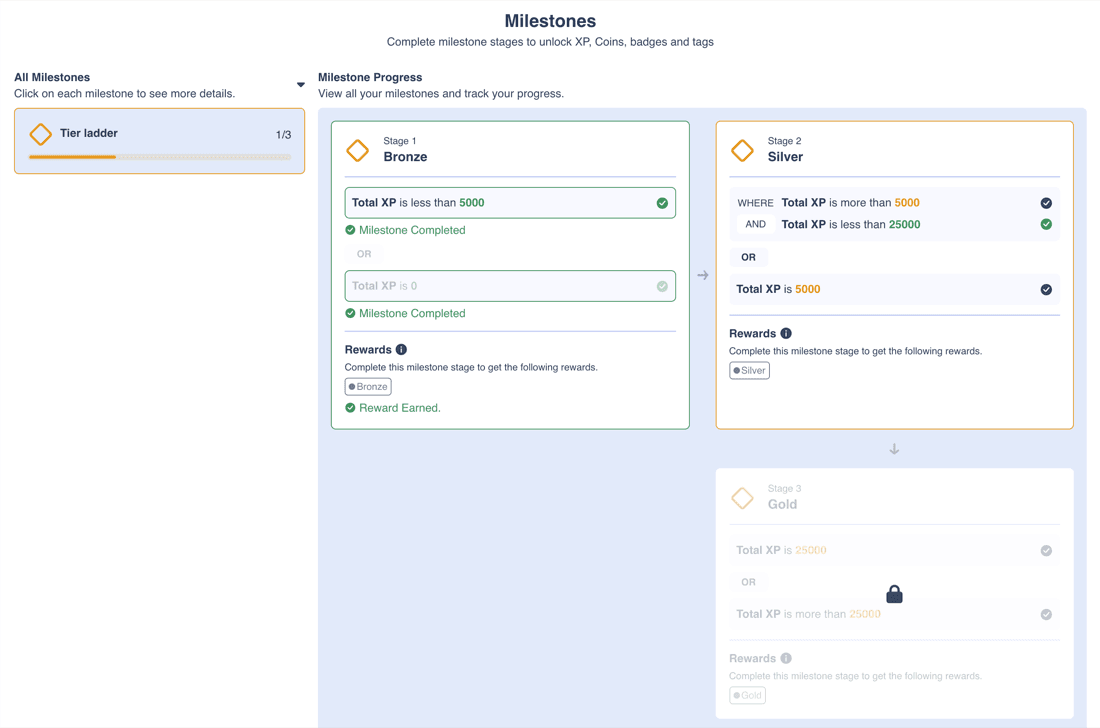
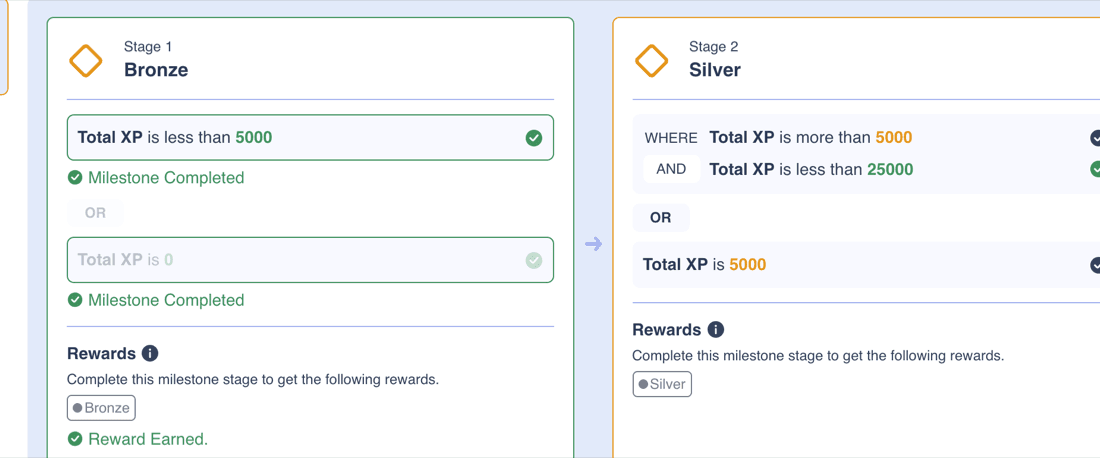
Product screenshots show a test community with a synthetic tier ladder. The displayed condition text is the product's own wording.
Other member views
A group can show a map instead of a list. An optional top-bar widget previews current progress. Numeric conditions can show a progress bar. During a countdown, reward chips show the base amount, multiplier and boosted amount.
A submission condition gives the member an Apply form. They can attach proof, write a message and see whether an admin approved or rejected it. Re-apply is available while attempts remain.
Ordinary conditions pay automatically when evaluated; there is no claim button. Submission conditions still need an application and approval.
What you control#
A group contains ordered stages. Each stage contains condition blocks, and each block contains conditions. AND or OR joins blocks and conditions; AND is the default.
Progressive or independent
With Progressive on, members complete stages in order and later ones stay locked. Use it for onboarding or education. With it off, stages are independent: a deposit or volume update can complete several bands in one evaluation and pay each qualifying stage.
| Setting | What it does |
|---|---|
| Progressive stages | Require stages in order. Later stages stay locked until the previous ones complete. With this off, stages are independent and can finish in any order. |
| Stage conditions | Choose member data, comparisons and AND/OR joins. Display the condition, a description, or both. An optional call-to-action button can guide members. |
| Stage and group rewards | Set separate rewards on each stage and a bonus for finishing the group. |
| Countdown | Start on a schedule, when a condition is met, or when a progressive stage unlocks. A reward multiplier applies during the window. |
| Reset | Daily, weekly or monthly group cycles in a fixed-offset timezone. Completed stages can be earned again after each reset. |
| Downgrades and re-achievement | Remove an awarded stage's roles and tags if its conditions stop passing. An optional setting pays XP and coins again after an observed loss and regain. |
| Start date | Gates activity before a chosen date. Also use a post-launch activity field or tested baseline if lifetime totals include history. Community Join Date and broker-account registration can differ; use a broker-supplied field if the account-open date matters. |
| Visibility | Hide the group from the Milestones page, or limit who sees it by roles, tags or members. Include a cohort condition if earning must be restricted. |
| Appearance | Choose colour, icon, background, list or map view, and an optional progress widget. |
What conditions can check
| Type | Examples |
|---|---|
| Platform activity | Visits, login days, XP, coins, level, tier, roles, tags, badges, messages, reactions, analyses and profile data. |
| Streaks and quizzes | Community streaks; active quizzes completed, passed or answered all correctly. |
| Custom user fields | Your KYC, deposit, lot or tenure fields. Create the field first, then write member values through your integration, CSV or a data workflow. |
| Rolling fields | Rolling numeric totals for 30, 60 or 90 days and calendar periods. Confirm your feed populates the field and triggers evaluation in your community. |
| Submissions | A member applies with proof. An admin approves or rejects it. Submission Attempt Limit restricts retries for that member. |
| Connected checks | Trustpilot Review needs a configured connection and can use a participation cap. Phone SMS Verified and WhatsApp Number Saved need their provider setup. |
Your data feed comes first
Milestones read user fields; they do not ingest broker events themselves. Write KYC, deposit and trading data into the appropriate fields. A field update can trigger a milestone check for that member.
Existing members and new field defaults
Setting a field default does not fill in values for existing members. Decide how a missing value affects eligibility, then have your integration populate the intended existing members and check their stored values before launch.
Rewards
| Reward | How it works |
|---|---|
| XP and coins | Each stage can award 0 to 999,999 of either. Its toggle must be on; coins also need community currency enabled. |
| Roles and tags | Add, remove or overwrite. Whole-list overwrite replaces existing assignments, so preserve unrelated access. |
| Badge | A badge can link to group completion, not an individual stage. Its own coin and XP reward can stack. |
| Custom reward | A named earned record with an icon. The platform records it; your team fulfils anything attached to it. |
| Group bonus | XP, coins, roles, tags and custom rewards when every configured stage is complete. |
| Countdown multiplier | A stage countdown boosts that stage's XP and coins; a group countdown boosts the group bonus. The multiplied amount is rounded down. |
Configured milestone webhooks can notify your fulfilment system about selected groups or stages. Completion can also create a member notification and send email when notification settings allow it. Confirm these channels in your setup.
Rules that affect your budget#
Strict thresholds
“Greater than 500” excludes exactly 500. For “at least 5 lots,” join “is 5” OR “greater than 5.” A just-below value works only when input precision makes intermediate values impossible.
Unfinished disabled stages block the group bonus
Group completion counts all configured stages. An unfinished disabled draft stage can block the bonus. Remove unused draft stages before launch.
No automatic coin or XP clawback
Downgrades can revoke a stage and its awarded roles and tags. Previously paid coins and XP remain, even after reset. Correct a balance separately if needed.
Define First Trade before building an offer
A condition based on positive recorded volume proves recorded trading activity, not that this is the member's first-ever broker trade. For a first-ever-trade offer, your integration must establish that fact and define whether existing traders can qualify.
- Re-achievement: with downgrades and repeat awards enabled, an observed and processed loss followed by regain can pay XP and coins again within one cycle. Ordinary repeated evaluations do not pay twice.
- Resets: daily, weekly or monthly resets reopen stage and group awards. Missed cycles are not caught up; already earned rewards remain.
- Lifetime totals and start dates: saving a group does not replay the whole member base. Later activity or reevaluation can complete a qualifying stage. A post-launch write of a lifetime total may include older activity, so use a post-launch measure or tested baseline with the start date.
- Visit requirement: when “Require a visit before users can earn coins or complete milestones” is on, progress may accumulate but completion is blocked before a recorded visit. Confirm when stored progress is reevaluated after that visit.
- Stacking: one event may pay milestone stages, a group bonus, trading rewards, a badge and a role reward. Budget for all applicable rewards.
- Visibility: view permissions control who sees a group. Put the cohort test in the conditions when only that cohort should earn.
Ways to use it#
These are example programmes. Rates and values are planning assumptions.
Activation
Onboarding ladder
5 stagesprofile to 5 lots
- Use progressive profile, KYC, deposit, first-trade and volume stages.
- For at least 5 lots, use is 5 OR greater than 5.
- Try a 72-hour, 2x first-deposit countdown.
Suits Teams improving funded-trader conversion.
Watch Supply eligible post-launch activity fields as well as a launch start date.
Funding
Deposit ladder
4 bands$100 to $5,000
- Use independent stages on a net-deposit field that subtracts withdrawals.
- For inclusive thresholds, join is the threshold OR greater than it.
- At the example rewards, cumulative value ranges from $2.50 to $75.00.
Suits Growing funded balance.
Watch Withdrawals do not automatically reclaim paid coins. Define sustained funding and repeat qualification.
Trading
Volume ladder
10–500 lotsexample bands
- Make one group per asset class or period.
- Bonus coins sit on top of ordinary trading rewards.
- Test rolling data and the first reset cycle before launch.
Suits Moving active traders into higher bands.
Win-back
Reactivation milestone
7 daysexample countdown
- Use login, deposit and trade stages.
- Require the dormant-cohort tag in each reward stage's conditions.
- Start a countdown when the first condition passes.
Suits Campaigns for dormant members.
Watch View permissions only control display. Set reset and re-achievement for the intended repeat policy.
Education
Learning path
3 stepsquiz, analysis, submission
- Combine quizzes and community activity.
- Use a submission for work needing staff review.
- Keep coin rewards modest and budget by qualifying members.
Suits Academies and webinars.
Watch Submission Attempt Limit limits retries, not total spend.
Retention
Tenure anniversaries
3–24 monthsexample tenure stages
- Use a broker-owned months-funded field.
- Award a role, coins or a group-linked badge.
- Define the eligible cohort for existing long-tenure members.
Suits VIP recognition and retention.
Advanced
Rolling VIP roles
90 daysrolling volume example
- Use rolling volume conditions for role benefits.
- Test role transitions and preserve unrelated roles and tags.
- Downgrades can remove awarded roles, but do not restore overwritten lower roles automatically.
Suits Programmes that manage role-based benefits.
Watch Confirm the rolling feed and evaluation in your community.
Hidden groups as engines
Hide Milestone can keep a group off the member Milestones page while it still operates. It can support a group-linked badge, role change or configured fulfilment notification. Logs and notifications may still reveal activity, so check the whole member experience.
Planning your economics#
Change the cohort, stage reach and rewards to estimate cost. The default five-stage example pays 1,710,000 coins, worth $8,550.00 for 1,000 members. The deposit and volume tabs show cumulative band costs.
Planning tool · not the admin panel
Milestone ladder planner
Plan the coin face value issued to one cohort. Reach rates and countdown completion shares are your estimates, not predictions.
Total coins
1,710,000
Coin face value: $8,550.00
- Coin face value per cycle
- $8,550.00
- Per registered member
- $8.55
- Per activated trader
- $34.20
- Per finisher
- $71.25
The funnel
| Stage | Members | Coins paid | Coin face value |
|---|---|---|---|
| Profile complete | 1,000 | 200,000 | $1,000.00 |
| KYC approved | 600 | 300,000 | $1,500.00 |
| First deposit | 300 | 600,000 | $3,000.00 |
| First trade | 250 | 250,000 | $1,250.00 |
| Traded 5 lots | 120 | 240,000 | $1,200.00 |
| Group bonus | 120 | 120,000 | $600.00 |
One-pass scenarios
Repeat awards from re-achievement can exceed these one-pass scenarios.
Each stage cost is cohort size times reach times stage coins, adjusted for the share that beats its countdown. The group bonus uses final-stage reach. The all-finish scenario assumes everyone beats every countdown once per planned cycle. Re-achievement can increase payouts.
Example assumptions: 100 coins per FX lot and $0.50 of reward value per FX lot. This model includes one award per stage per planned cycle; re-achievement can add more coins. Stage, trading, badge and role rewards can stack.
Timing and limits#
- Crediting is automatic after the condition is met. Timing varies, so do not promise an exact delivery time.
- Tracked activity, including field writes, visits, messages and XP changes, can trigger reevaluation. Submission approvals and bulk updates can also trigger checks. Saving a group alone does not sweep every member.
- Daily resets occur at 00:00, weekly on Monday at 00:00, and monthly on the first day at 00:00, in the chosen fixed-offset timezone. It does not adjust for daylight saving.
- After a reset, lifetime numeric progress uses the reset baseline for the new cycle. Prove the first cycle with your chosen field and feed before relying on weekly or monthly results.
- Countdown rewards apply only inside the window and are rounded down. Editing an active countdown updates it; stopping it discards its settings.
- Stage XP and coins range from 0 to 999,999. The reward multiplier ranges from 1 to 99,999 with up to two decimal places. Submission attempts range from 1 to 999.
Not supported yet#
- Not supported
Inclusive numeric comparison
There is no greater-than-or-equal operator. Join is the threshold OR greater than it.
- Not supported
Direct cash or trading-credit grant
A custom reward records an earned item. Use your own fulfilment after a configured milestone notification or log.
- Not supported
Automatic coin or XP clawback
Downgrades and resets do not take back paid balances.
- Not supported
Yearly or member-specific reset
Group resets are daily, weekly or monthly.
- Not supported
Badge on one stage
Badge milestones select a group, not an individual stage.
- Not confirmed
First reset cycle for lifetime fields
Confirm the baseline and first participation after a weekly or monthly reset in your community.
- Not confirmed
Anniversary from Join Date
Use a broker-owned tenure field for the anniversary example.
- Not confirmed
First-visit payout timing
A visit makes the member eligible for evaluation. Confirm when stored progress is evaluated and paid.
For your developers#
Milestones react to user-field updates. See Trading volume and rewards for the data flow.
- Get User MilestonesRead stage completion for one member.
- Update a user field valueWrite KYC, deposit or volume values.
- Create a user field definition
- List user field definitions
- Create User
- Bulk update users from CSV
- Get bulk update job status
- Update User XP and Currency
Reading group completion through the API
The milestone progress API lists enabled stages and reports the group's completion separately. Check the group result as well as its stage results; an all-complete returned stage list is not by itself proof that the group bonus was awarded.
Example prizes, reward rates and planner figures are synthetic planning assumptions, not Returning.AI defaults or a rate card. Configuration limits and stated admin defaults are identified in the guide.